Straightaway Powered by Mapbox
- 3.3
- Rating
- 50.00K
- Installs
- Free
- Price

 Analysis by App-foxy
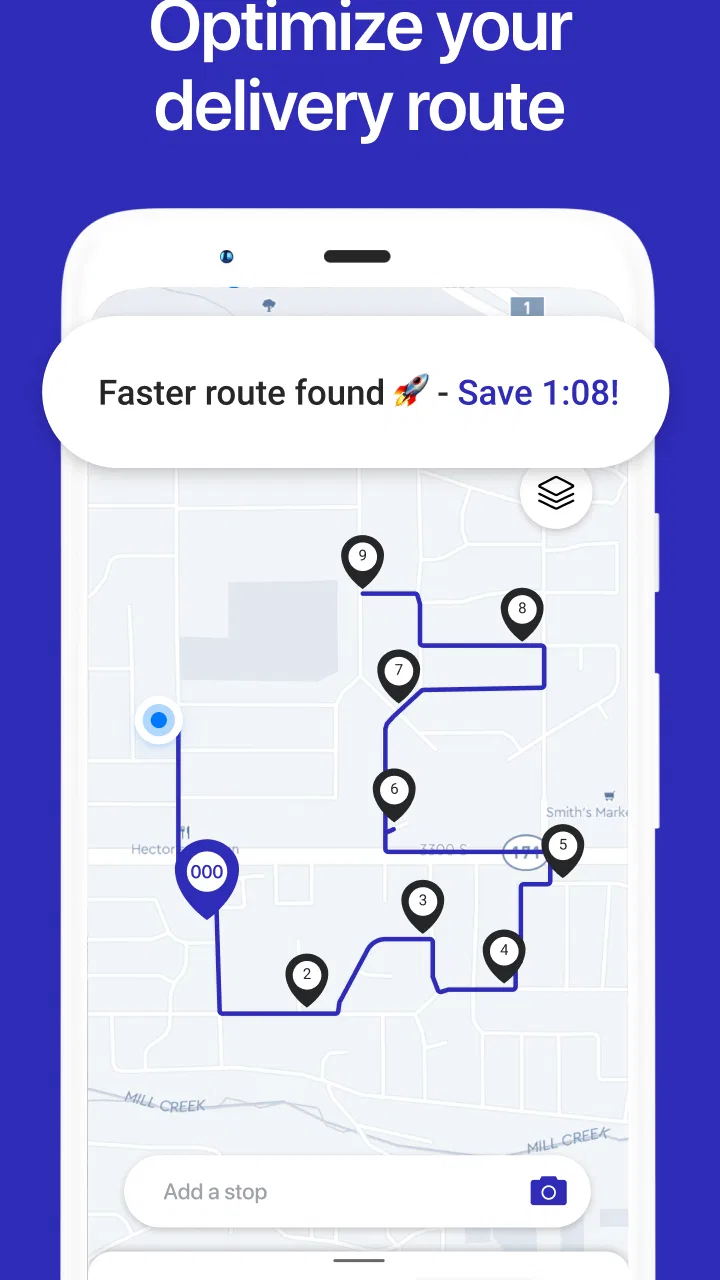
Planning several stops in one outing sounds simple until the destinations start pulling you in different directions. A normal navigation app is usually excellent at getting me from where I am to one place, but it is less comfortable when I need to organize a whole sequence of errands, deliveries, appointments, or service calls. That is the problem Straightaway Powered by Mapbox tries to solve. It is a free Maps & Navigation app from Straightaway, LLC that combines multi-stop route planning with turn-by-turn guidance.
I approached it as a practical tool rather than a replacement for every navigation app on my phone. Its strongest idea is straightforward: put several destinations into one trip, arrange them more intelligently, and then follow the resulting route. In my experience, that makes the most sense when the order of stops matters and wasted driving time is more annoying than the few minutes needed to prepare the route.
From a messy list of stops to a usable driving plan
My starting condition for testing was the kind of day many people recognize: several places to visit, no obvious order, and a need to finish somewhere specific rather than simply wander between pins. I would not choose a dedicated route-planning app for a single grocery run. I would consider it when a list contains enough stops that manually checking each destination in a standard map becomes repetitive and easy to get wrong.
You May Also Like

 Blood Strike: 2.5 Anniversary
Blood Strike’s Loadouts Turn Every Drop Into a Tactical Gamble
A close look at Blood Strike’s custom loadouts: how fast access to signature weapons reshapes its battle royale rhythm, rewards preparation, and narrows the gap between fights.

 Pandora - Music & Podcasts
Pandora’s Music Is Easy to Start, but Harder to Recover
Pandora’s strength is its low-effort path from a seed to a station. Its weak spot is how much confidence it asks you to place in connection, setup, and quiet recovery.

 8 Ball Pool
 Is Built on Rivalries, Rematches, and Routine
A close look at the rivalries, rematches, shared routines, and unanswered safety questions that turn a quick pool match into a persistent mobile community.

 Samsung Music
’s Quiet Strength Is Playing What You Already Own
Its reach comes less from spectacle than from dependable access to a personal library. That simplicity is both the app’s strongest retention engine and its ceiling.

 AccuWeather: Weather Radar
AccuWeather Review: A Quick, Clear Forecast for Everyday Decisions
For everyday plans, the best forecast is the one you can understand quickly. AccuWeather makes rain timing, radar, and local conditions easy to act on, with a few trade-offs.

 Hill Climb Racing
Why Hill Climb Racing Still Turns Crashes Into One More Run
A tiny car, a bumpy hill and one more upgrade: Hill Climb Racing keeps resurfacing because its simple chaos makes every near-miss feel personal.
More From Our News Desk



The first useful distinction is between finding destinations and organizing a trip. Standard map apps tend to focus on the next destination. Straightaway is more relevant when the entire chain matters. That difference is especially helpful for independent couriers, mobile technicians, real-estate workers, home-care visits, event setup, or a family trying to combine several errands without crossing the same neighborhood repeatedly.
I would still treat the suggested order as a starting point, not an unquestionable command. Real plans contain constraints that a purely efficient route may not understand: a store may close earlier than another, a client may require a narrow arrival window, or one stop may involve loading bulky items. The practical advantage is that I can think about those constraints before driving instead of discovering them halfway through the day.
The app is aimed at ordinary users as well as people who make repeated multi-stop trips. Its Everyone content rating makes the audience broad, and it runs on Android devices using version 8.0 or later. The current version is 5.3.1, so anyone using an older phone should check compatibility before building a workflow around it.
Building the route without losing the human plan
The sensible workflow begins with collecting every destination before starting navigation. I found that this is more reliable than adding one stop at a time while already on the road. Entering the complete list first gives me a chance to notice duplicate addresses, an incorrectly recognized place, or a destination that does not belong in the same outing.
That preparation step is one of the app’s less obvious strengths. Route optimization is only useful when the inputs are clean. If I enter a business name that has several branches, I need to verify that the selected location is the one I actually intend to visit. A route can look impressively efficient and still be wrong if one pin points to the wrong side of town.
Once the stops are assembled, the planning stage becomes a negotiation between the app’s efficient sequence and my real-world priorities. I might accept the suggested order for flexible errands, then mentally reserve a particular stop for a time-sensitive appointment. For work, I would prepare the route before leaving and review the sequence against the day’s commitments rather than assuming the shortest-looking arrangement is automatically the best one.
The best result comes from treating optimization as advice, not as a substitute for judgment. That sounds obvious, but it changes how I use the app. A route planner can reduce unnecessary backtracking; it cannot know that I need to pick up a key before visiting a property or that frozen food should be the final stop. Those details belong in my planning process.
Moving from planning into navigation
After the route is arranged, the important handoff is from the planning screen to active driving guidance. This is where Straightaway becomes more than a list organizer. Its turn-by-turn navigation is intended to carry the plan into the trip itself, so I do not have to rebuild every leg manually in a separate map app.
That continuity is valuable on a busy day. Re-entering each destination can introduce small errors, and repeatedly switching apps makes it easier to lose track of which stop comes next. A single route gives me a clearer mental model: finish the current destination, continue to the next planned point, and keep the overall sequence visible.
There is also a useful handoff between the person preparing the route and the person driving it. A dispatcher, office worker, or family member can think through the order before the trip begins, while the driver concentrates on the live directions. I would still review the route personally before departure, particularly if someone else created it, because a neatly arranged sequence can hide an unsuitable destination or an impractical stop order.
For a solo user, the handoff is internal: planning happens while parked, navigation happens once the car is moving. That separation is worth preserving. I would avoid making route changes while driving, even if the app makes the overall process feel convenient. The planning benefit disappears if the driver is distracted by editing the itinerary.
A realistic day with several errands
Imagine I need to collect a repaired laptop, drop off a parcel, visit a pharmacy, and finish at a relative’s home. The usual approach would be to open a familiar map, search for the first place, navigate there, then repeat the process. That works, but it leaves the order largely to me, and I may only realize at the third stop that I have driven past a better sequence.
With Straightaway, I would enter all four destinations while still at home or parked. I would check the selected locations, consider which stop has the strictest timing, and then let the app help organize the flexible destinations around it. If the pharmacy has a practical closing constraint, I would protect that stop rather than blindly follow an order designed only around distance.
During the trip, the value is not that every decision becomes automatic. The value is that the route has already been thought through. After collecting the laptop, I can follow the next leg instead of stopping to decide what comes next. If an errand is canceled, I can reconsider the remaining sequence rather than continuing with an obsolete plan.
This scenario also shows where the app is not a magic solution. Traffic, parking, loading time, and queues can change the best route. A sequence that is efficient on the map may be inconvenient if one destination is difficult to access from a particular direction. I would use the planned route to reduce needless travel, then adjust my expectations for the parts that happen after I arrive.
Where it fits beside familiar map apps
The usual alternatives remain better for some jobs. If I need a quick search for a nearby café, a live look at a single journey, or a broad map of an unfamiliar area, a mainstream navigation app may feel faster because it is already part of my routine. Those apps often have deeper everyday familiarity, and switching tools is not worthwhile for a simple one-destination drive.
Straightaway earns its place when the trip itself is the problem. Its focus on multiple stops makes it more purposeful than a general map, especially when I want to reduce backtracking before I start. I would describe it as a planning layer with navigation attached, rather than as a universal replacement for every map feature I use elsewhere.
That focus creates a trade-off. A specialized workflow can be clearer for route-heavy days, but it may feel unnecessary for casual navigation. Someone who rarely visits more than one destination in a trip may find the extra preparation slower than simply opening a familiar map and driving. Someone who repeats multi-stop routes can reasonably value the preparation time because it prevents decisions from piling up on the road.
The Mapbox reference in the app’s name helps identify the mapping foundation, but I would judge the product by the complete workflow rather than by the underlying map label. What matters to me is whether the destinations are correctly entered, the order makes sense, and the navigation remains usable once the car is moving.
Practical friction before and during the drive
The app’s average rating is 3.3 from around 165 ratings, with roughly 84 written reviews. I read that as a reason to keep expectations measured. The concept is useful, but route planning is sensitive to small interface problems: an awkward search result, an unclear stop order, or a route that requires more manual correction than expected can quickly undermine the benefit.
Another consideration is the business model. The app is free to download, while in-app purchases range from about $9.99 to $95.99 per item. That makes it easy to try the basic experience before committing, but anyone considering it for regular professional use should inspect which planning needs are covered without payment and which may lead to an in-app purchase. I would make that decision only after testing a representative workday, not after a single short drive.
There is also a mental cost to route optimization. The more stops I add, the more important it becomes to verify the plan. A long itinerary can create false confidence: because the route looks organized, I may forget to account for appointment times, parking, breaks, or the physical effort of loading and unloading. Straightaway can structure the driving portion, but it does not replace a schedule or a checklist.
For that reason, I recommend a two-pass routine. First, build the route with every destination. Second, inspect it as a human itinerary: look for time-sensitive stops, awkward crossings, closures I already know about, and tasks that should be grouped together. This small habit is more valuable than simply accepting the first optimized order.
Who will get the most from it
I think the app is a strong candidate for people whose day contains several independent destinations. A delivery driver may use it to prepare a run before leaving. A tradesperson could organize service calls across a neighborhood. A parent might combine school-related stops, shopping, and appointments into one planned outing. A volunteer coordinator could use the same approach for visits that do not naturally follow a familiar route.
It is also useful for occasional complex trips. I do not need to be a professional driver to benefit from having a route prepared for a day of sightseeing, moving small items between locations, or handling errands in an unfamiliar city. The important condition is that there are enough stops for ordering them to matter.
I would skip it if my normal need is simply “take me to this one place.” I would also be cautious if I need highly specialized scheduling, detailed fleet management, or a full business dispatch system. The app’s core appeal is multi-stop route planning and navigation; expecting it to replace every operational tool used by a larger organization would be unfair and likely frustrating.
People who dislike preparing before a trip may not enjoy it either. Its benefit appears before the driving begins. If I refuse to enter destinations, check the order, or correct an ambiguous location, there is little reason to choose a route-focused app over a familiar one-stop navigator.
Small habits that improve the outcome
My first tip is to separate fixed stops from flexible ones. I decide which destinations have timing, access, or personal importance, then allow the app’s route logic to help with the rest. This avoids the common mistake of letting a mathematically tidy order disrupt the actual purpose of the day.
My second tip is to review the first and last stop especially carefully. The opening destination determines how quickly the trip gets moving, while the final destination often affects the whole sequence. If I need to end near home, work, or a meeting, that endpoint should shape the route from the beginning rather than being added as an afterthought.
My third tip is to prepare while stationary and keep changes deliberate. If a destination disappears, I would pull over before editing the route. If a new urgent stop appears, I would decide whether it belongs in the current trip or should wait. The app can make a changing itinerary manageable, but it cannot make unsafe multitasking acceptable.
A fourth insight is that the route should be judged by total effort, not only road distance. A slightly longer drive may be better if it avoids carrying heavy items through multiple stops or places a difficult parking destination at a more suitable point in the day. I use the app to expose the travel pattern, then apply practical knowledge that no route order can fully encode.
My conclusion after following the complete workflow
Straightaway Powered by Mapbox is most convincing when I begin with a scattered list of destinations and finish with a route I can actually follow. The transition from input to organized sequence, then from sequence to turn-by-turn guidance, is the product’s central strength. It reduces the repeated searching and manual ordering that make multi-stop days feel more complicated than they should.
I would recommend trying it if multi-stop driving is a recurring annoyance, especially if backtracking costs you time or attention. The free entry point makes experimentation straightforward, while the available in-app purchases mean regular users should evaluate the paid path against their own workload. Its Everyone rating and support for Android 8.0 or later also make it approachable for a broad range of users.
My recommendation is more cautious for single-destination drivers or people seeking a complete professional logistics suite. In those cases, a familiar general-purpose map or a specialized business platform may be a better match. Straightaway is at its best in the middle ground: more organized than ordinary navigation for several stops, but still focused enough to remain understandable.
After using it as a complete planning-and-driving workflow, I see a practical tool rather than a miracle optimizer. If your real problem is deciding how several stops should fit together, this app is worth testing; if your problem is simply reaching one address, you probably do not need it.
FAQs for Straightaway Powered by Mapbox
01What is Straightaway Powered by Mapbox used for?
Straightaway Powered by Mapbox is a route-planning and navigation app designed to help drivers organize multiple stops efficiently. It can be useful for delivery workers, couriers, sales representatives, and anyone making several visits in one trip. The app focuses on arranging destinations in a practical order, displaying routes on a map, and helping users move between stops without manually planning every leg of the journey.
02Can Straightaway optimize a route with multiple stops?
Yes, the app is built around multi-stop route planning. You can add several destinations and let Straightaway help determine a more efficient sequence, which may reduce unnecessary driving compared with visiting addresses in the order they were entered. Results can depend on traffic, road restrictions, stop priorities, and the accuracy of the addresses, so users should review the proposed route before starting.
03Does Straightaway provide turn-by-turn navigation?
Straightaway can help plan and visualize a route, but the exact navigation experience may depend on the version of the app, your device, and any supported navigation services connected to it. In some situations, it may hand off directions to another navigation application rather than replace it completely. Check the route carefully and follow local traffic laws instead of relying exclusively on the screen.
04Is Straightaway Powered by Mapbox free to download and use?
The availability of free features, paid upgrades, subscriptions, or usage limits can vary by platform and change over time. Before downloading, review the current Google Play Store or Apple App Store listing for pricing details, in-app purchases, and any restrictions on the number of stops or routes. If you use the app professionally, also confirm whether the available plan suits your daily driving volume.
05What information and permissions does Straightaway require?
A route-planning app generally needs destination information and may request location access so it can show your position and support navigation while driving. You may also need to enter or import addresses, depending on the features available in your version. Review the app’s privacy policy and permission prompts before granting access, and provide only the permissions necessary for the functions you actually intend to use.
Pros
- Accurate route guidance with clear turn-by-turn directions.
- Offline maps help reduce data usage in areas with weak reception.
- Quickly searches nearby businesses
- services
- and points of interest.
- Clean interface makes essential navigation tools easy to find.
- Mapbox-powered maps offer detailed coverage in many regions.
Cons
- Some advanced navigation features may require an internet connection.
- Map updates and regional coverage can vary by location.
- Location tracking may noticeably affect battery life during long trips.
- Search results may be less complete than those from larger map services.
- Privacy-conscious users may dislike continuous location data collection.

Straightaway Powered by Mapbox
Gallery